
One AI prompt · Free · Open source
You worked the room.
Don't let the leads go cold.
One AI prompt turns your event's Telegram chats into a ready-to-work CRM, or a CSV if you'd rather.
Your own AI builds it, right on your computer.
Runs in your own AI · we never see your chats · free and open
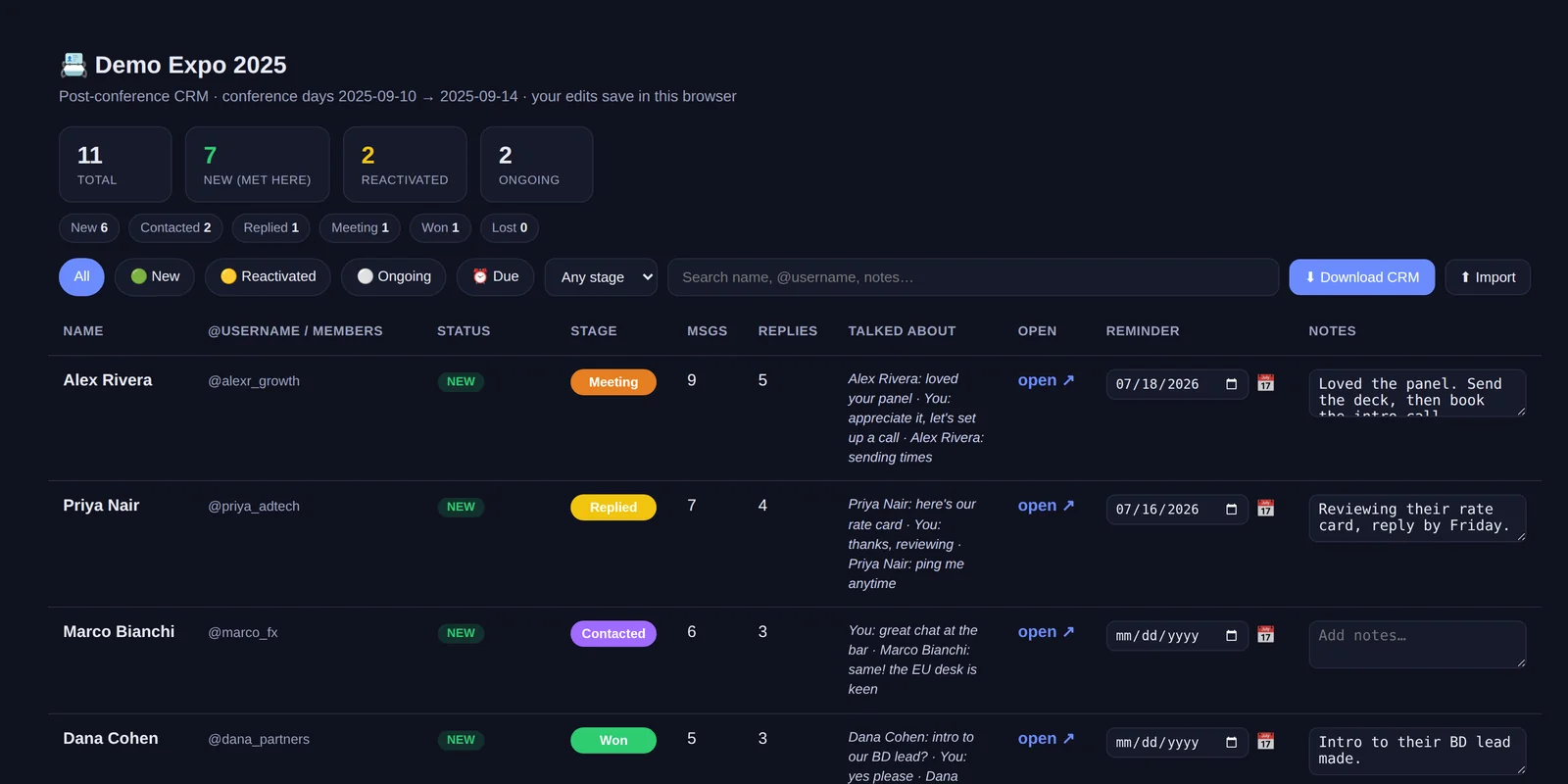
The real tool, shown with example contacts. Every edit saves right in your browser. No login.
Fresh off the event
You just met 80 people.
The window is open right now.
One prompt turns last night's chats into a ready-to-work follow-up list, in minutes, so you reach out today, not next week.
Even the contact you added at 3am after the afterparty, the one you barely remember, is right here with a snippet of what you talked about.
Warm leads don't wait.
The deal goes to whoever follows up first.
Step one, done for you
Your AI sorts everyone three ways
So you know instantly how to open each one.
🟢
New
You met them at the event.
"Great to meet you the other day."
🟡
Reactivated
An old contact, back in touch.
"Been too long. Good to reconnect."
⚪
Ongoing
Someone you already chat with.
Just keep the thread going.
Your whole conference, at a glance
See the pipeline in one screen
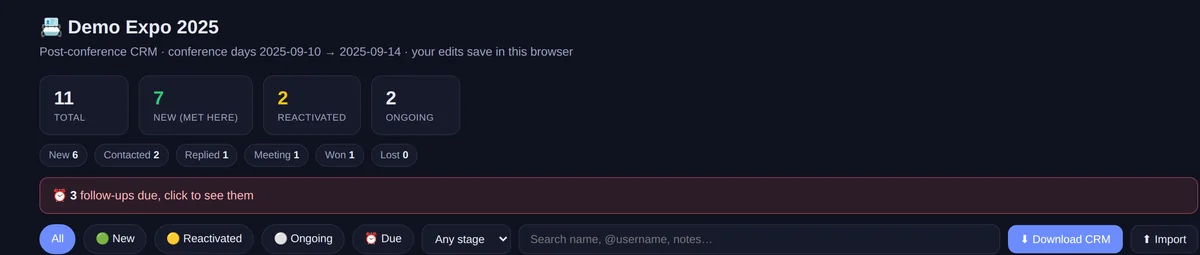
✓How many you met
Everyone you spoke with, counted for you.
✓How many are new
New faces, split from people you already knew.
✓Where each one sits
Their stage in your follow-up pipeline.
Everything about one person
One row, all the context

✓One-click chat
Their @username and a link straight to the thread.
✓The context
A snippet of what you last talked about.
✓Your follow-up
A stage, a notes box, and a reminder date.
Now, and a month from now
Reminders that reach your calendar
Work the list today, then run it again next week. Your notes and dates stay put, so no warm lead slips through as time passes.

✓Set a date
Give anyone a day to follow up.
✓See who's due
One click filters the list to just them.
✓To your calendar
One tap into Google, Apple, or Outlook.
It's a spreadsheet too
Take it anywhere, one click
Stages, notes, reminders, all of it. Download the list, split it with your team, or drop it into any CRM. Nothing stays trapped in the tool.
Google Sheets & Excel
One click downloads the whole list as a spreadsheet. Open it anywhere.
Split it with your team
Hand the list to your sales team and divide the follow-ups between you.
Straight to your calendar
Reminders drop into Google, Apple, or Outlook like any event.
Any CRM you run
HubSpot, Notion, Pipedrive, anything that opens a spreadsheet.
The five-minute workflow
File them once. Find them for good.
The CRM lines up everyone you met, labelled and sorted. You skim it once, then file each name into your own Telegram folders. Telegram stays clean because you filed it, not because a bot reached in.
1
Everyone, already sorted
The CRM lays out everyone you met, each typed New, Reactivated, or Ongoing, with a pipeline stage. No scrolling to remember who was who.
2
You pick the folder
The label tells you where each one goes. A hot lead to Hot. An old contact you rekindled to Follow up. A founder to Partners.
3
You drag them in
Open Telegram, drop each name into its folder. A whole room filed in minutes, then one tap away for good.
What the CRM does
Reads your chats, builds the list, sorts by type and stage, labels everyone. It only ever reads, never changes a thing: it organises what is already there, nothing more.
What you do
Skim the sorted list, then file each lead into your own folders. The organising is done, so filing takes minutes and your event stays tidy.
Folders are yours to make in Telegram. The tool only reads your chats and lists them out. It never creates a folder, moves a chat, sends a message, or touches your account.
The flow, start to finish
From your email to your CRM
📧 Drop your email in the form
We send you one simple instruction to paste into your AI, plus the link. No account, nothing to install here.
📥 Open the email
Inside: the exact instruction to paste into your AI, and a link to the code if you'd rather look first.
🤖 Paste it into your AI
Paste it into your AI assistant, like Claude, or whatever AI tool you use. Your AI sets everything up and runs the tool for you.
🔑 Connect your Telegram, view only
Connect your Telegram directly and sign in once, or point it at a saved copy of your chats instead, with no sign-in at all. Your AI walks you through whichever you pick.
✅ Open your CRM and follow up
Your follow-up list is ready. Start with the new folks. They fade fastest.
Is it safe?
Your AI only reads. Nothing is uploaded.
It all runs inside your own AI, on your computer. We never see your chats, we couldn't if we tried. And even if we could, we wouldn't, we have plenty of our own to get through.
It only reads
It looks. It never touches.
No actions
Sends nothing, deletes nothing, adds no one.
Invisible
Your contacts never know you ran it.
Stays local
Nothing leaves your computer.
Your connection
Talks only to Telegram. No cloud, no account.
Open source
Free and open. Anyone can read the code.
Good to know
Quick questions
Do I need to be technical?
No. Your AI does the setup. You answer a couple of questions.
Will my contacts know?
Never. It only reads, and messages no one.
Which chats does it include?
Your one-on-one chats and small groups. Big and public groups are skipped, and only chats active during the event show up.
Where do my notes live?
In your browser, on your computer. Download the spreadsheet to back them up.
Only for conferences?
Any date range works. A trade show, a launch week, a city trip.
What does it cost?
Nothing. It is free and open source.
Built for founders, salespeople, recruiters, and anyone in business development. Anyone who works a room and lives in Telegram.
Get the free tool
Drop your email
We email you one simple instruction to paste into your AI, plus the link.
Free and open source. No spam. Unsubscribe anytime.
Check your inbox
Your instruction and the link are on their way.
Nothing in a minute? Check spam, or email us.
The proof is in the pudding
This is CRgraM, in miniature
That tool works one event.
CRgraM works every chat, all the time.
- ✓ Reads your ongoing chats, not just one event's
- ✓ Flags deals going cold, drafts your next reply
- ✓ Lives in your Telegram, private and under your control
Tick the box and you're on the early-access list.